Your First Textual Step
In this tutorial you'll build a small project step that uses Titan's ctx.textual API so it looks consistent with built-in workflows.
You will learn how to:
- write a project step in
.titan/steps/ - use
ctx.textual.begin_step()andend_step() - ask the user for input and return metadata to later steps
The scenario
You want a small workflow that asks for a release name and saves it into workflow context so another step can use it later.
Step 1 - Create the step file
Create .titan/steps/ask_release_name.py:
from titan_cli.engine import WorkflowContext, WorkflowResult, Success, Error


def ask_release_name(ctx: WorkflowContext) -> WorkflowResult:
    if not ctx.textual:
        return Error("Textual UI context is not available for this step.")

    ctx.textual.begin_step("Release Name")

    try:
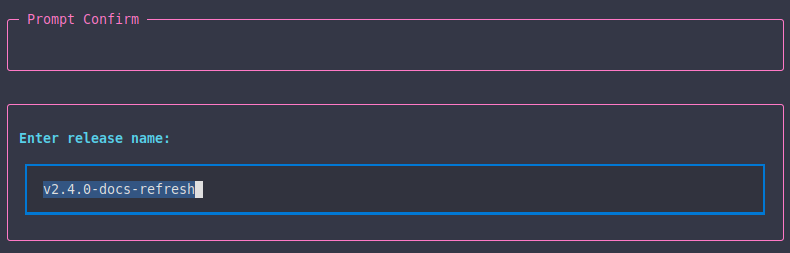
        name = ctx.textual.ask_text("Enter release name:")
    except (KeyboardInterrupt, EOFError):
        ctx.textual.end_step("error")
        return Error("User cancelled")

    if not name:
        ctx.textual.end_step("error")
        return Error("Release name is required")

    ctx.textual.success_text(f"Using release name: {name}")
    ctx.textual.end_step("success")
    return Success("Release name captured", metadata={"release_name": name})
Things to notice:
- the function name
ask_release_namemust match the YAMLstep:value exactly begin_step()andend_step()make the output look like Titan's built-in stepsask_text()gives you a consistent prompt UImetadatasavesrelease_namefor later steps
Step 2 - Create a workflow
Create .titan/workflows/release-name-demo.yaml:
name: "Release Name Demo"
description: "Ask for a release name and show it"

steps:
  - id: ask-release-name
    name: "Ask Release Name"
    plugin: project
    step: ask_release_name

  - id: show-release-name
    name: "Show Release Name"
    command: "printf 'Release: %s\n' '${release_name}'"
    params:
      release_name: "${release_name}"
This workflow:
- runs your project step first
- stores
release_namein workflow context - uses that value in a later step
Step 3 - Run it
Launch Titan and run the new workflow from the menu.
You should see:
- a step header for
Release Name - a Textual prompt asking for the release name
- a success message once the value is captured